
Uploading ISOs & VM Images to Acropolis Hypervisor (AHV)

A common question is how do I upload an ISO or Virtual machine image to the Acropolis Hypervisor, well in NOS 4.5 this task just got radically simpler.

The below shows the “Home” screen in PRISM UI. As we can see in the top left we are running the Acropolis Hypervisor (AHV) version 20150616.

By clicking the gear wheel at the top right, we can then access the “Image Configuration” menu.PRISMHomeImageService

The “Image configuration” menu is a quick and easy way to upload ISOs and Virtual Machine images to Acropolis.

Below we can see its a very simple process, simply give the Image a name along with annotation, select from a drop-down list the Image type, being ISO or Disk (RAW format, .img) and then select the image source, either from a URL or by uploading a file from your machine.

CreateImage

Once you have selected your ISO or Disk, hit save and the image will be uploaded and the status of the upload will be shown as per the below:

CreateImageUploading

Once its completed, PRISM shows the following Summary:
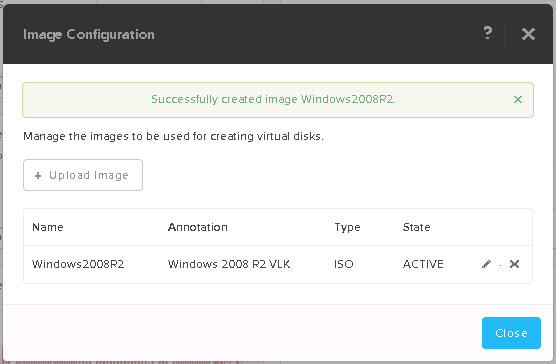
ImageConfigurationSuccess

Now when you create a new VM, you will be able to select “Clone from Image Service” and select the ISO Image from a drop-down list. How simple is that!
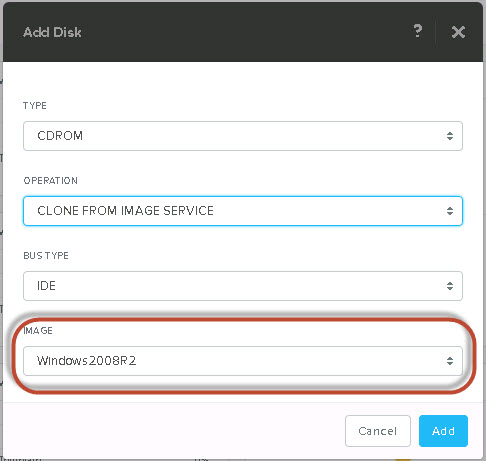
CDROMimageservice

Simple as that! Now you can boot your VM and start using the ISO. The same process can also be used to upload VM disk images.

MS Exchange on Nutanix now a MS validated ESRP solution

I am pleased to announce that Nutanix has successfully completed the Microsoft Exchange Solution Review Program requirements and are now listed as a validated solution at the following URL:

Exchange Solution Reviewed Program (ESRP) – Storage

The solution shows a dual site 24,000 1GB Mailbox solution running on just 8 NX-8150 nodes. This is a very highly resilient solution with N+1 availability at each site allowing for full self healing and failover in the event of a node failure.

Nutanix is also the FIRST and only hyper-converged platform to be validated under ESRP, further strengthening our leadership in the market.

The performance testing (using Jetstress) was with the nodes at around 90% capacity with 8.5TB per node, proving that Nutanix provided great performance even when running at high utilization and where the working set far exceeds the SSD tier. This is key to a truly enterprise solution for a business critical application such as Exchange.

The solution is running on Hyper-V with SMB 3.0 on the underlying Nutanix Distributed Storage Fabric. The same solution can also be deployed on vSphere or Acropolis Hypervisors using iSCSI in a fully supported configuration.

The above solution was validated without using Compression or Erasure Coding both of which improve performance and give significant capacity savings which allows for larger mailboxes. As a result, the Nutanix platform provides even more value than the ESRP submission shows.

If there was any doubt around if you should virtualize MS Exchange on Nutanix platform, the fact Nutanix is now validated by Microsoft should put your mind at ease.

Now you can move one step closer to a fully webscale datacenter by removing another application specific silo and enjoy improved resiliency/performance while reducing operational cost and complexity.

Acropolis Hypervisor (AHV) & non-uniform node CPU generations

For those of you familiar with VMware vSphere’s Enhanced vMotion Compatibility (EVC) feature, you might be wondering how non-uniform CPU generations are handled in an Acropolis Hypervisor (AHV) environment.

Well, as with most things Nutanix, the answer is simple.

NOS 4.5 automatically detects and configures the lowest common CPU generation as the baseline on a per cluster basis.

The following diagram shows how it works:

AHVEVC2

As we can see, we have a four node Acropolis cluster with 3 different CPU generations. Acropolis detects Sandy Bridge as the lowest common denominator and ensures VMs on all nodes are only exposed the Sandy Bridge CPU capabilities.

This ensures Live migration capabilities are maintained across the cluster.

Note: As with vSphere’s EVC, VMs still benefit from higher clock rates and performance from newer generation CPUs, they just don’t have all CPU capabilities exposed, so don’t be fooled into thinking your newer/faster CPUs are wasted in a mixed environment.