NOS 4.5 Delivers Increased effective SSD tier capacity

In addition to the increased effective SSD (and SATA) tier capacity gained by using Erasure Coding (EC-X) which was announced at the Nutanix .NEXT conference earlier this year, the upcoming NOS (Nutanix Operating System) 4.5 is providing a yet another effective capacity increase for the SSD tier.

Here’s how it works:

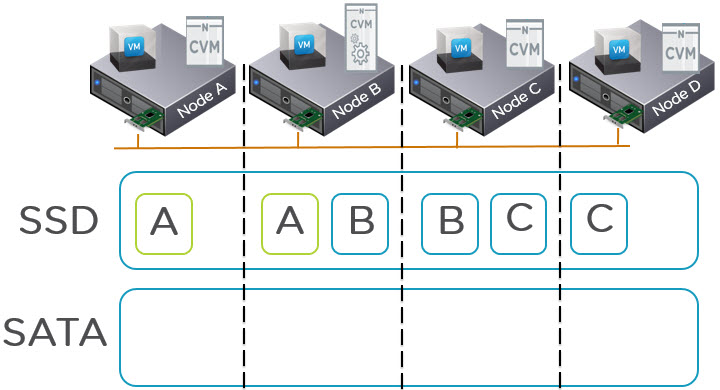
The below 4 node cluster has 3 VMs actively using data (known as extents) represented by the A,B,C blocks. This is a very simplified example as VMs will have potentially hundreds or thousands of extents distributed throughout a cluster.
AllHotDataSSD

What we can see in the above diagram is two copies of each piece of data as this is an RF2 deployment. The VM on Node A is using extent A, the VM on Node B is using extent B and the VM on Node C is using extent C.

Because the VMs are using Extents A,B and C, they all remain within the SSD tier including the replicas distributed throughout the cluster. When these extents become cold they will be dynamically moved to the SATA tier.

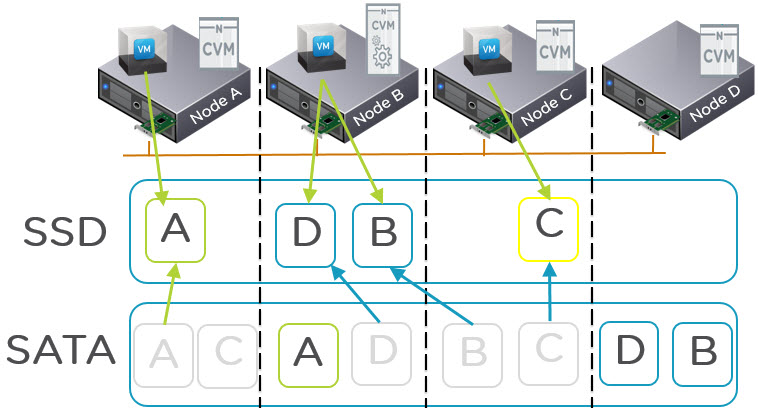
What is changing in NOS 4.5 is the Nutanix tiering solution called ILM (Intelligent Lifecycle Management) now perform up-migrations (from SATA to SSD) on a per extent basis which means replicas are treated independent of each other. What this means is the hot extents will up-migrate to SSD on the node where the VM is running (via Data Locality) giving all flash performance while the replicas distributed throughout the cluster will remain in the SATA tier as shown below:
PerExtentUpMigrations

As we can see in the above diagram, all copies of A,B,C and D were in the SATA tier. Then the VM on node A started frequently reading from data A and the local extent is therefore up-migrate to SSD.

For the VM on node B, it started frequently accessing data D and B. Data D was up-migrated from local SATA and data B was up-migrated AND localized as it was residing on a remote node. The VM on node C also up-migrated from local SATA the same as VM on node A.

Now we can see that out of the 8 extents, we have 4 which have me up-migrated and localized (where required) and 4 which remain in the low cost SATA tier.

As a result the SSD tiers effective capacity is doubled for RF2 and tripled for RF3. So this means for customers using RF2, the active working set can potentially double while still providing all flash performance.

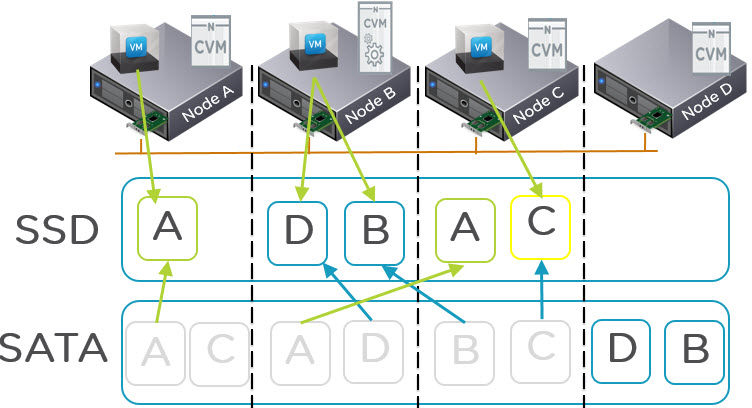
If data is frequently being overwritten NDFS will detect this and up-migrate both the local and remote copy/copies to ensure write I/O is always serviced by the SSD tier. The below diagram shows Data A being up-migrated to node C SSD tier ready to service the redundant replicas for any write I/O.
PerExtentUpMigrationsWriteIO

As typical mixed workload environments have a higher Read vs Write ratio e.g.: 70/30 the benefits of only up-migrating one extent when it becomes hot is effective for a large percentage of the I/O.

Even in the event the Read vs Write Ratio is reversed e.g.: 30/70 which is typical for VDI environments, the new ILM process will still provide a significant effective increase of the SSD tier by only up-migrating one out of two extents. It should be noted for VDI solutions, VAAI-NAS already provides huge data reduction savings thanks to intelligent cloning and as a result it is not uncommon to find large VDI deployments on Nutanix using only the SSD tier.

Summary:

NOS 4.5 delivers Double or Triple (for RF3) the effective SSD tier capacity in addition to data reduction savings from technologies such as deduplication, compression and Erasure Coding (EC-X). This feature is like most things with Nutanix is hypervisor agnostic!

Not bad for a free software upgrade huh!

Related Posts:

1. Scaling Hyper-converged solutions – Compute only.

2. Advanced Storage Performance Monitoring with Nutanix

3. Nutanix – Improving Resiliency of Large Clusters with Erasure Coding (EC-X)

4. Nutanix – Erasure Coding (EC-X) Deep Dive

5. Acropolis: VM High Availability (HA)

6. Acropolis: Scalability

7. NOS & Hypervisor Upgrade Resiliency in PRISM

Deduplication and MS Exchange

Virtualization and Storage always seem to be a hot topics in regards to Exchange deployments and many of you would have seen my post Virtualizing Exchange on vSphere with NFS backed storage a while back.

This post was motivated by a tweet from fellow VCDX which stated:

dedupe not supported for Exchange, no we can’t turn it off.

Later in the twitter conversation he went on to say

To be clear not an MS employee, another integrator MS “master” certified. It’s the whole NFS thing again

I have heard similar over the years and for me the disappointing thing is the support statement is unclear as are the motivations behind support statements for Exchange in general. e.g.: Support for VMDK on NFS

The only support statement I am aware of regarding Exchange and deduplication is in the technet article “Exchange 2013 storage configuration options” under the section “Volume configurations for the Exchange 2013 Mailbox server role” at it states:

storageexchange

In the above statement which specifically refers to “a new technique to optimize storage utilization for Windows Server 2012” is states that for Stand-alone or High availability solutions de-duplication is not supported for Exchange database file unless the DB files are completely offline and used for backup or archives.

So the first question is “Is array level deduplication supported”?

There is nothing that says that it isn’t supported that I am aware of, so if you are aware of such a statement please let me know in the comments and I will update this post.

My interpretation of the support statement is that array level deduplication is supported and MS have simply called out that the deduplication in Windows 2012 is not. Regardless of if you agree or disagree with my interpretation, I think its safe to say the support statement should be clarified with justification.

The next question I would like to discuss is “Should deduplication be used with Exchange”?

Firstly we should discuss the fact Exchange can be deployed with Database Availability Groups (DAGs) which creates multiple copies of Exchange databases across up to 16 Exchange Mailbox (or Multi-Role) servers.

The purpose of a DAG is to provide high availability for the application and data.

So if the application is by design making duplicate copies, should the storage be undoing this work?

Before I give my opinion on deduplicating DAG copies, I want to be clear on two things:

1. Deduplication is a well proven technology which many different vendors implement either in-line or post process or in some cases both.

2. As array level deduplication is abstracted from the Guest OS and Application, there is no risk to the application such as data corruption or anything like that.

So back to deduplicating DAG copies.

I work for Nutanix and I wrote our best practice guide for Exchange which can be found below. In the guide, I recommended Compression but not deduplication. In an upcoming update of the document the recommendation remains to use compression but adds a further recommendation to use Erasure coding (EC-X) for data reduction.

Nutanix Best Practices Guide: Virtualizing Microsoft Exchange on Web-Scale Converged Infrastructure.

The reason for these recommendations is three fold:

1. Compression + EC-X give excellent data reduction savings for Exchange which generally result in usable capacity higher than RAW capacity while still providing data protection at the storage layer.

2. Deduplicating data which is deliberately written multiple times is a huge overhead on any infrastructure as data is still processed multiple times by the Guest OS, Storage Network and storage controller even if deplicate copies are not written to disk. To be clear, the Guest OS (CPU) and Storage network overhead are not eliminated by dedupe.

3. Nutanix recommends the use of hybrid nodes for Exchange with a small percentage of capacity provided by SSD (for all write I/O and hot data) and a large percentage of capacity provided by SATA. As a result the bulk of the data is stored on low cost SATA so the commercial benefit ($ per GB) of deduplication is minimal especially after compression and EC-X.

In my opinion deduplicating everything regardless of its profile is not the answer, so data reduction such as deduplication, compression and Erasure Coding should be able to be turned off for workloads which give minimal benefit.

For Exchange DAGs, deduplication should give excellent data reduction results in line with the number of DAG copies. So if an Exchange DAG has 4 copies, then approx 4:1 data reduction should be achieved right off the bat. Now this sounds great but when running a DAG on highly available shared storage (SAN/NAS/HCI) it is unnessasary to have 4 copies of data.

In reality, I recommend 2 copies when running on Nutanix because the shared storage provided by Nutanix keeps at least 1 additional copy (if using EC-X) or where using RF2 or RF3, 2 or 3 copies of data meaning in the event of a drive or node failure, the data is still available to the application without requiring a DAG failover. Similar is true when running Exchange on SAN/NAS/HCI solutions with some form of RAID or replication for data protection.

So the benefit of deduplication would therefore reduce to from possibly 4:1 down to 2:1 because only 2 DAG copies are really required if the storage is highly available.

Considering the data reduction from compression and storage solutions supporting Erasure Coding, I think deduplication is only commercially viable/required when using expensive all flash storage which lets face it, is not required for Exchange.

If you have chosen an all flash solution and you want to run all workloads on it and eliminate having silos of infrastructure for different workloads, then by all means deduplicate Exchange DAGs otherwise it will be a super expensive solution. But, in my opinion hybrid is still the best solution overall with the only real advantage of all flash being potentially higher and more consistent performance depending on many factors.

Summary:

I hope that Microsoft clarify their position regarding support for array level data reduction technologies including deduplication with detailed justifications.

I would be disappointed to see Microsoft come out and update the support policy stating deduplication (for array’s) is not supported as there is not technical reason it should not be supported (Happy to be corrected if credible evidence can be provided) regardless of if you think its a good idea or not.

Having worked in the storage industry for a long time, I have seen many different deduplication solutions used successfully with MS Exchange and I am yet to see any evidence that it is not a totally viable and enterprise grade option for Exchange databases.

The question which remains is, do you need to deduplicate Exchange databases? – My thinking is only where your using all flash systems and need to lower cost per GB.

My position being the better solution would be choose a hybrid solution when eliminating silos which gives you the best of all worlds and applications requiring all flash can have all flash and other workloads can use flash for hot data and lower cost SATA for cold storage or data which doesn’t require SSD (like Exchange).

How to validate VMware Certifications

It seems of late there is more and more people claiming to be VCDX as well as VCAP when they are not. This to me shows the people have no integrity and I would not want to work with a person who lied about a certification to try and get a job.

Luckily there is an easy way to validate if a person has a certification or not.

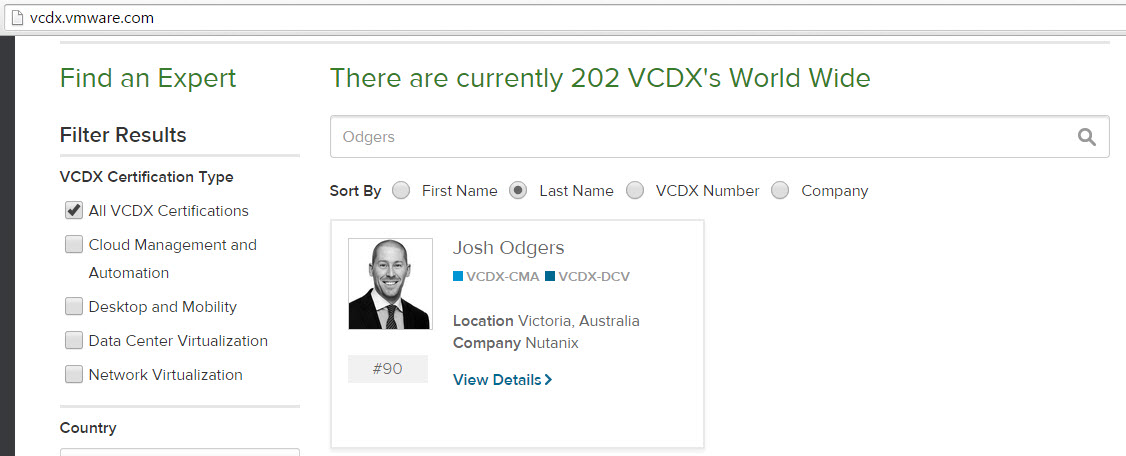
For VCDX its super easy, visit http://vcdx.vmware.com and enter the persons First Name, Last Name , VCDX Number or Company and you can quickly find out if they are VCDX or not.

See example below:

findvcdx1

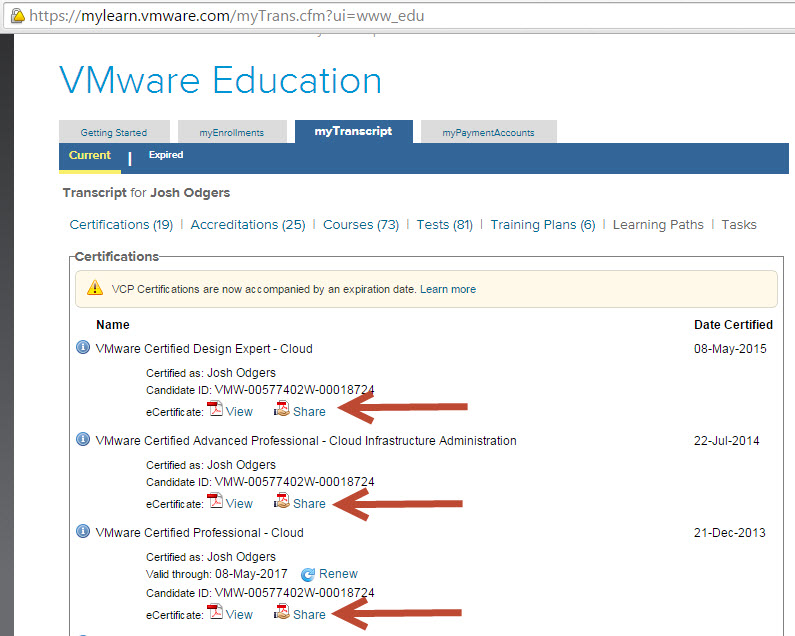
Another way is to have the person login to http://mylearn.vmware.com and open their transcript. The transcript shows all VMware certifications including VCA , VCP, VCAP , VCIX and VCDX.

The following shows part of my transcript which shows VCDX, VCAP and VCP certs inc:

  • VMware Certified Design Expert – Cloud
  • VMware Certified Advanced Professional – Cloud Infrastructure Administration
  • VMware Certified Professional – Cloud

certshare

You will also see the “Share” button, what this does is allow you to give a URL to a prospective employer or recruiter for them to validate your certification/s.

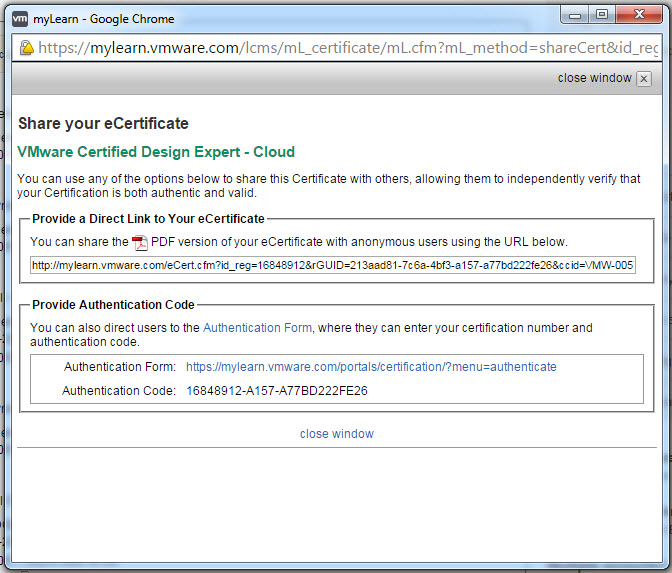
To use this facility, simply click the “Share” button and you will be prompted with a window similar to the below:

ShareYoureCert

This gives you two options:

1. Share the PDF version of your certificate with anyone by simply copy and pasting the URL.

You will see something similar to this:

ecertpdf

2. Share the Certification Authentication form URL and Code and allow anyone to check the current status of your certification.

The following is what you will see when you click the Authentication Form button:

authcert

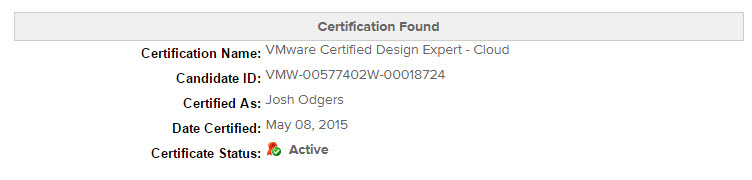
Simply type the random numbers and click Authenticate and you will see something similar to the below:CertFound

Simple as that!

I hope this post helps potential employers and recruiters validate candidates credentials and stamp out this growing trend of people claiming they have VMware certifications (especially VCDX) when they don’t.