NOS & Hypervisor Upgrade Resiliency in PRISM

I have had several prospective and existing customers say how much they like the One Click upgrade PRISM provides for NOS, Hypervisor’s, Firmware and NCC. These customers typically also ask questions about what happens if they perform a One Click upgrade and the cluster is for any reason degraded such as from a drive, node, block failure.

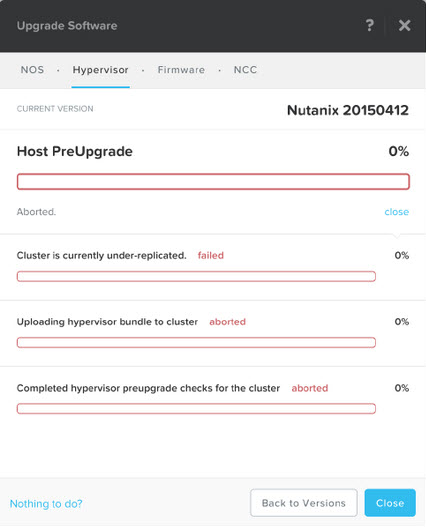
Before starting a One Click upgrade, NOS always performs Pre-Upgrade checks to ensure the cluster is healthy. In the event the cluster is not fully resilient the upgrade process will be aborted as shown below:

AcropolisUpgrade


In the above case, the cause of the cluster being “under-replicated” (meaning the configured Resiliency Factor of 2 or 3 was not in compliance) was due to the fact NOS had just be upgraded on the cluster and one of the nodes had not yet come back online when the One Click Upgrade for the Acropolis hypervisor (AHV) was started.

Other situations where the cluster may be under replication is following a HDD, SSD, Node or Block failure. In all these cases, the Nutanix Distributed File System (NDFS) will restore resiliency assuming sufficient rebuilt capacity is available in the Storage Pool. This is why Nutanix always recommends clusters be designed with at least N+1 available capacity to ensure rebuild capacity exists and the cluster can automatically self heal.

As a general rule it is recommended to wait for approx 10 mins between NOS and Hypervisor upgrades to avoid these kind of issues, or you can simply check the Home screen of PRISM and ensure the Heath status is Good as shown below:

HealthGood

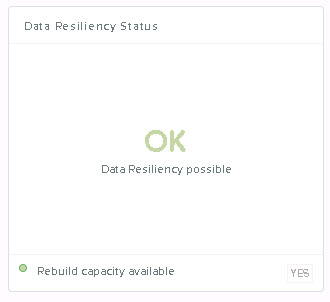
and that the Data Resiliency Status is “OK” as shown below.DataResiliencyOk

Both the Health and Data Resiliency status are Hypervisor agnostic and appear on the Home screen of all Nutanix deployments.

If both the Health Status and Data Resiliency are good then you can go ahead and start the upgrade and it should complete successfully.

Summary:

PRISM will not start an upgrade of NOS or the Hypervisor if the cluster is degraded, so you can rest assured that even if you attempt an upgrade by accident when the cluster is degraded, NOS will protect you.

Related Posts:

1. Scaling Hyper-converged solutions – Compute only.

2. Acropolis Hypervisor (AHV) I/O Failover & Load Balancing

3. Advanced Storage Performance Monitoring with Nutanix

4. Nutanix – Improving Resiliency of Large Clusters with Erasure Coding (EC-X)

5. Nutanix – Erasure Coding (EC-X) Deep Dive

6. Acropolis: VM High Availability (HA)

7. Acropolis: Scalability

Acropolis Hypervisor (AHV) I/O Failover & Load Balancing

Many customers and partners have expressed interest in Acropolis since it was officially launched at .NEXT in June earlier this year, and since then lots of questions have been asked around resiliency/availability etc.

In this post I will cover how I/O failover occurs and how AHV load balances in the event of I/O failover to ensure optimal performance.

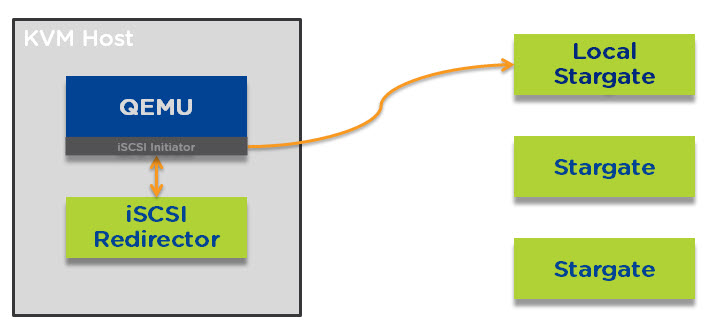
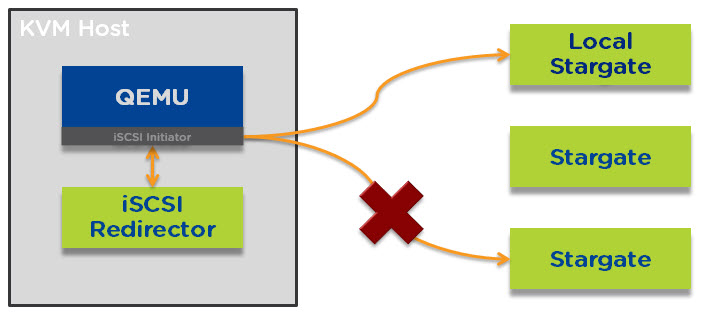
Let’s start with an Acropolis node under normal circumstances. The iSCSI initiator for QEMU connects to the iSCSI redirector which directs all I/O to the local stargate instance which runs within the Nutanix Controller VM (CVM) as shown below.

AHVMPdefault

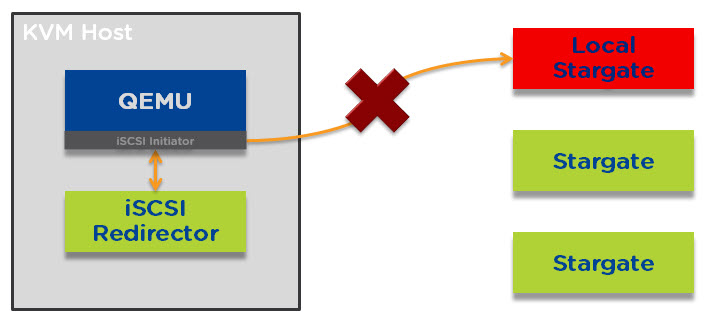
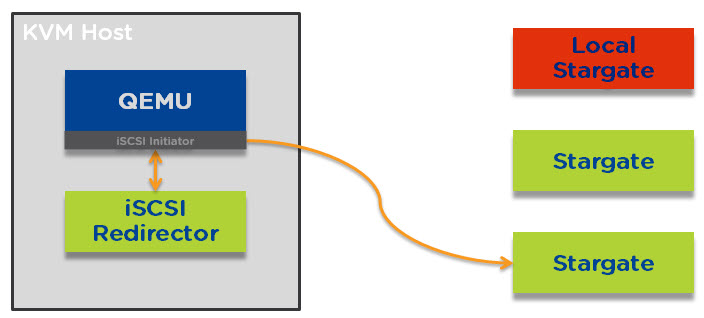
I/O will always be serviced by the local stargate unless a CVM upgrade, shutdown or failure occurs. In the event one of the above occurs QEMU will loose connection to the local stargate as shown below.AHVMPfailedlocal

When this loss of connectivity to stargare occurs, QEMU reconnects to the iSCSI redirector and establishes a connection to a remote stargate as shown below.AHVMPremote

The process of re-establishing an iSCSI connection is near instant and you will likely not even notice this has occurred.

Once the local stargate is back online (and stable for 300 seconds) I/O will be redirected back locally to ensure optimal performance.

AHVMPfailback

In the unlikely event that the remote stargate goes down before the local stargate is back online then the iSCSI redirector will redirect traffic to another remote stargate.

Next lets talk about Load Balancing.

Unlike traditional 3-tier infrastructure (i.e.: SAN/NAS) Nutanix solutions do not require multi-pathing as all I/O is serviced by the local controller. As a result, there is no multi-pathing policy to choose which removes another layer of complexity and potential point of failure.

However in the event of the local CVM being unavailable for any reason we need to service I/O for all the VMs on the node in the most efficient manner. Acropolis does this by redirecting I/O on a per vDisk level to a random remote stargate instance as shown below.

pervmpathfailover

Acropolis can do this because every vdisk is presented via iSCSI and is its own target/LUN which means it has its own TCP connection. What this means is a business critical application such as MS SQL / Exchange or Oracle with multiple vDisks will be serviced by multiple controllers concurrently.

As a result all VM I/O is load balanced across the entire Acropolis cluster which ensures no single CVM becomes a bottleneck and VMs enjoy excellent performance even in a failure or maintenance scenario.

As i’m sure you can now see, Acropolis provides excellent resiliency and performance even during maintenance or failure scenarios.

Related Posts:

1. Scaling Hyper-converged solutions – Compute only.

2. Advanced Storage Performance Monitoring with Nutanix

3. Nutanix – Improving Resiliency of Large Clusters with Erasure Coding (EC-X)

4. Nutanix – Erasure Coding (EC-X) Deep Dive

5. Acropolis: VM High Availability (HA)

6. Acropolis: Scalability

7. NOS & Hypervisor Upgrade Resiliency in PRISM

Scaling Hyper-converged solutions – Compute only.

A quick bit of history on Nutanix, back in mid 2013 when I joined, in almost every meeting I went to, and presentation I gave, there was a common theme. People wanted to scale compute and storage at different rates.

Now this makes perfect sense, and this issue has long been addressed by a large range of node types which can be mixed in the same Nutanix cluster.

For example: NX3060 nodes with Dual Intel Haswell CPUs and ~2TB usable storage can be mixed with NX6060 nodes also running dual Intel Haswell CPUs but with ~8TB usable each.

Nutanix also has configure to order (CTO) nodes where size of SSDs and HDDs can be modified to suit customer requirements. So at this point I never have a challenge sizing for a customer workload as I have plenty of great options to choose from.

Another common question has been “How do I scale storage only?”. Nutanix has also addressed this in an intelligent way and as a result adding “Storage Only” nodes makes sense as I described in Scale Storage separately to Compute on Nutanix!

In recent months a new question has emerged and a small percentage of partners/customers have been asking about adding Compute only nodes (e.g.: Traditional ESXi hosts) to a Nutanix (or HCI) cluster.

My first question to these customers/partners is: Why?

The typical reply is something like “Because we need to add more VMs which have low storage requirements” or “Because we don’t need storage”.

Let’s look at these answers:

Firstly, my favourite one, “Because we don’t need storage”.

Is this really true, or do you mean the new VMs have low storage requirements. In almost all cases the truth is the new VMs have a small requirement for storage capacity and performance.

So next let’s look at the other common (and more realistic) situation:

“Because we need to add more VMs which have low storage requirements”

So this is very possible and something a HCI solution should cater for and for Nutanix we do. For example one of our most popular nodes is the NX-3050 or NX-3060 which are a compute heavy node with 2 sockets each with up to 24 physical CPU cores (Haswell) and 512GB RAM.

This node also comes with 2 x SSDs and 4 x SATA HDDs with a minimum usable capacity of approx 2TB (of which 20% is SSD).

So while the solution adds some capacity, its giving the added advantage of ensuring all the advantages of HCI while eliminating the complexity of a 3-tier architecture, which is why customers are flocking to HCI in the 1st place.

Even if the capacity is not required and the SSDs simply service the reads locally where required and increase the shared SSD tier of the cluster which means more write performance for workloads throughout the cluster. Sounds pretty good to me!

Does having an additional 4 x SATA drives really matter? Well from a cost perspective, its minimal cost and thanks to Disk Balancing, the SATA drives will hold some data (such as replicas) which lowers the overheads on other nodes, therefore improving resiliency and performance.

So there is lots of advantages to adding even a small amount of storage even if the new workloads don’t require most of it.

But for those of you who aren’t already convinced that adding some storage is advantageous, how about adding dual Intel Haswell CPUs and up to 512GB RAM just 1 x SSD to accelerate write I/O and serve what little storage locally that the VMs need and just 2 x SATA HDDs.

Nutanix has such a node, which is another option to scale high compute and very low storage.

Another question I get is: “Is the fact Nutanix can’t do this why you don’t recommend it?”

The answer is, Nutanix can add compute only, and we can actually do it very well and get very good performance, but its not HCI and it adds complexity which is not necessary which is why we don’t recommend (or Productise) this option.

Now let’s look at what adding compute only to HCI looks like?

warning-contents-may-offend_design-200x200 (1)

*Scroll down when ready!

V
V
V
V
V
V
V
V
V
V
V
V
V
V
V
V
V

HCInotHCI


Yuk! That looks like old school 3-tier stuff to me!

As the above shows, adding Compute Only to HCI basically means you have a non HCI solution for part of your workloads.

Non HCI workloads on compute only nodes would therefore:

  • Be running in the same setup as traditional 3-tier infrastructure
  • Have different performance than HCI based workloads
  • Loose the advantage of having compute + storage close together
  • Increase dependency on Network
  • Impact network utilization of HCI node
  • Impact benefits of HCI for the native HCI workloads and much more.

The industry has accepted HCI as they way of the future and while adding compute only nodes might sound nice at a high level, its just re-introducing the class 3-tier complexity and problems of the past.

Summary:

If you have already invested in HCI, you clearly understand the advantages and value of the solution. Adding compute only is not a true “value” its just a “perceived value”.

Adding “Compute only” is just adding complexity and moving away from the value HCI brings, so my advice, don’t make the mistake, but if you have, you now know the solution.

Invest in a compute+storage node (albeit at a higher CAPEX) and enjoy the continued value of HCI and improve performance and resiliency to your entire cluster! Now that’s real value (at a reasonable cost).

And just remember….

cheaper

Related Posts:

1. Acropolis Hypervisor (AHV) I/O Failover & Load Balancing

2. Advanced Storage Performance Monitoring with Nutanix

3. Nutanix – Improving Resiliency of Large Clusters with Erasure Coding (EC-X)

4. Nutanix – Erasure Coding (EC-X) Deep Dive

5. Acropolis: VM High Availability (HA)

6. Acropolis: Scalability

7. NOS & Hypervisor Upgrade Resiliency in PRISM